Governed analytics for Excel, BI and AI

Define business meaning once. Serve it fast to every tool.

One governed model gives dashboards, Excel, SQL clients, APIs and AI agents the same approved number, served from automatically maintained summaries.

  • Define once
  • Govern once
  • Serve everywhere
  • Accelerate automatically

The hosted trial is the SF1 demo (about 1 GB). Benchmark figures come from the separate SF1000 run.

Tessallite architectureExcel add-in and web app, BI tools, SQL clients, Apps and APIs, and AI agents connect through the Tessallite Gateway, which contains the semantic layer, performance boosters and the optimizer and scheduler. The Gateway serves BigQuery, PostgreSQL, Spark preview and Redshift preview.TOOLSSOURCESExcel add-inand web appBI toolsSQL clientsApps / APIsAI agentsTessallite GatewaySemantic layerPerformanceboostersOptimizer &schedulerBigQueryPostgreSQLSpark (preview)Redshift (preview) Tessallite architectureExcel add-in and web app, BI tools, SQL clients, Apps and APIs, and AI agents connect through the Tessallite Gateway, which contains the semantic layer, performance boosters and the optimizer and scheduler. The Gateway serves BigQuery, PostgreSQL, Spark preview and Redshift preview.TOOLSExcel add-inand web appBI toolsSQL clientsApps / APIsAI agentsTessallite GatewaySemantic layerPerformance boostersOptimizer & schedulerSOURCESBigQueryPostgreSQLSpark (preview)Redshift (preview)

What Tessallite is

Five parts, one governed path to your data.

To your tools, Tessallite looks like a database. To your business, it holds one approved definition, one access policy and one fast path. Models are versioned like software, and AI helps maintain glossaries.

  • Semantic layer

    Define business meaning once.

    • Measures, dimensions, hierarchies
    • KPIs and glossary
    • Custom calculations
    • Access and security rules
  • Performance boosters

    Pre-build answers from real queries.

    • Summary tables
    • Pocket tables
    • Named queries and lists
    • Auto-route to the fastest safe path
  • Optimizer & scheduler

    Keep answers fast and fresh.

    • Logs every query
    • Builds boosters
    • Schedules refreshes
    • Tracks source changes
  • Gateway

    One governed entry point.

    • Excel add-in and web app
    • SQL over PostgreSQL wire, JDBC
    • DAX, MDX and XMLA
    • REST, JSON and MCP
  • Conversational agent

    Ask in plain English.

    • Understands intent
    • Picks the right chart
    • In Excel or standalone
    • Answers only through the governed model

Product proof

One add-in panel to browse fields, track KPIs, analyse and ask.

The panel sits beside your PivotTables. Every figure comes from the governed model.

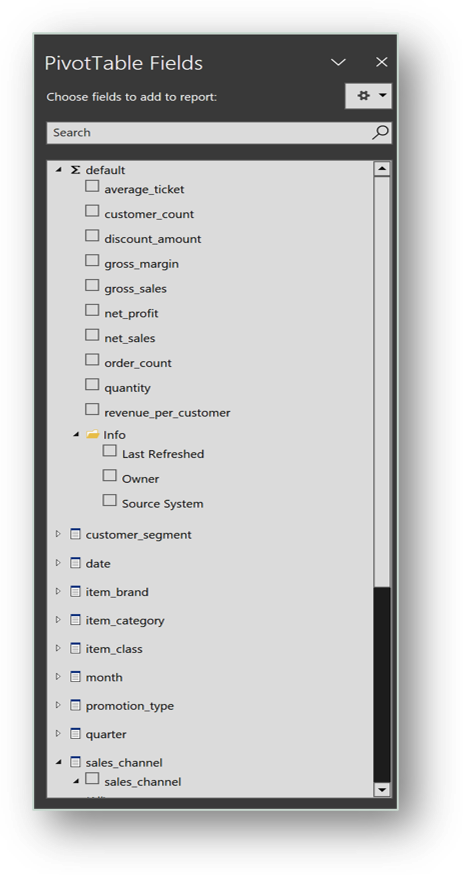
  1. Excel field list showing model measures, dimensions and an Info folder with owner and source system
    Browse the model Model fields in the native field list.
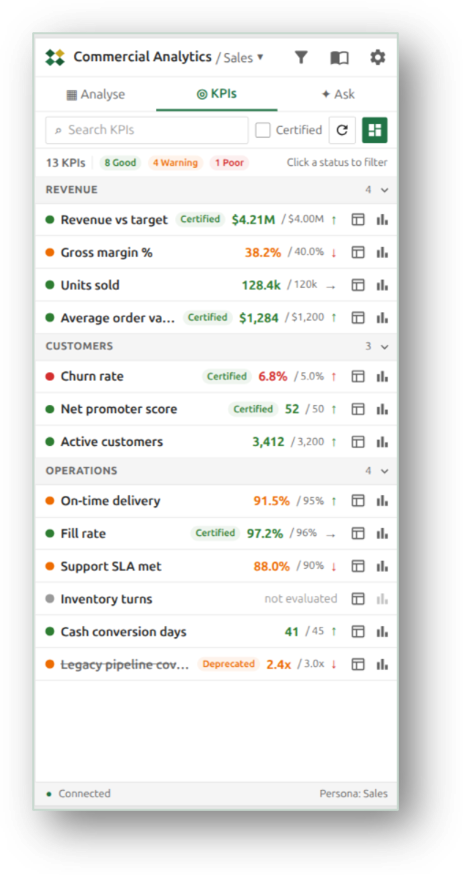
  2. Tessallite add-in KPIs tab listing certified KPIs with values, targets and status
    Track KPIs Targets, status and certified marks.
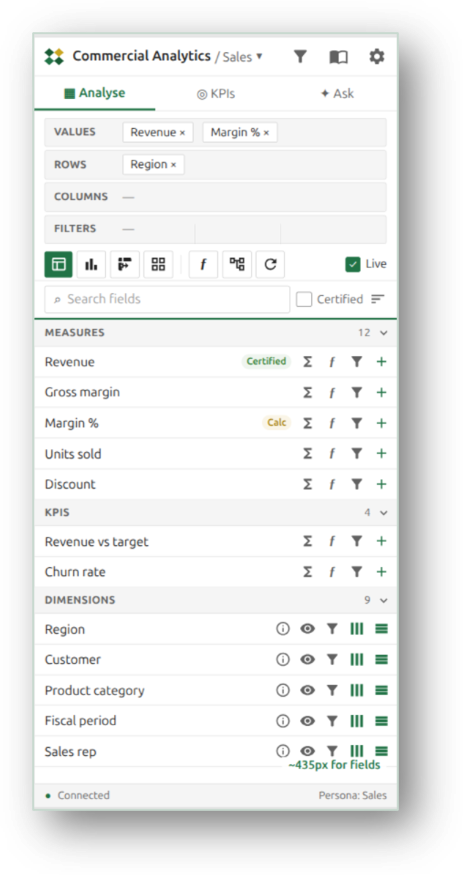
  3. Tessallite add-in Analyse tab with values, rows, columns and filters areas above the field list
    Analyse Drag fields into rows and values.
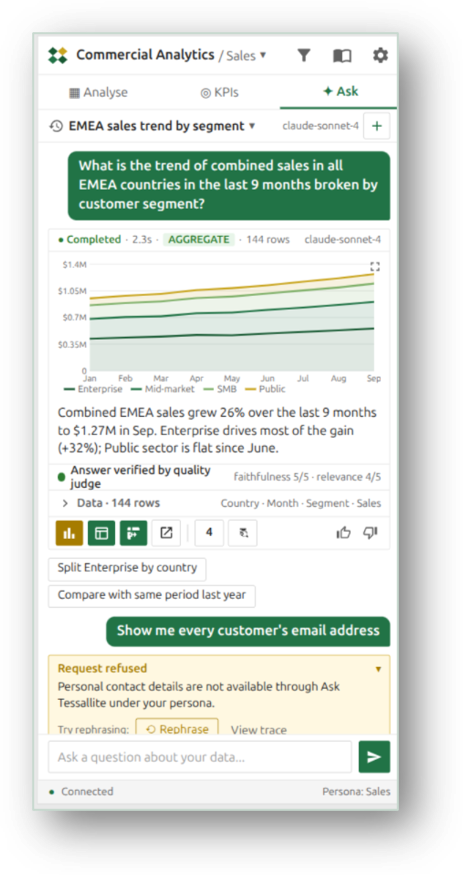
  4. Tessallite add-in Ask tab answering a sales trend question with a chart, and refusing a request for customer email addresses
    Ask in plain English Charts, with persona rules enforced.
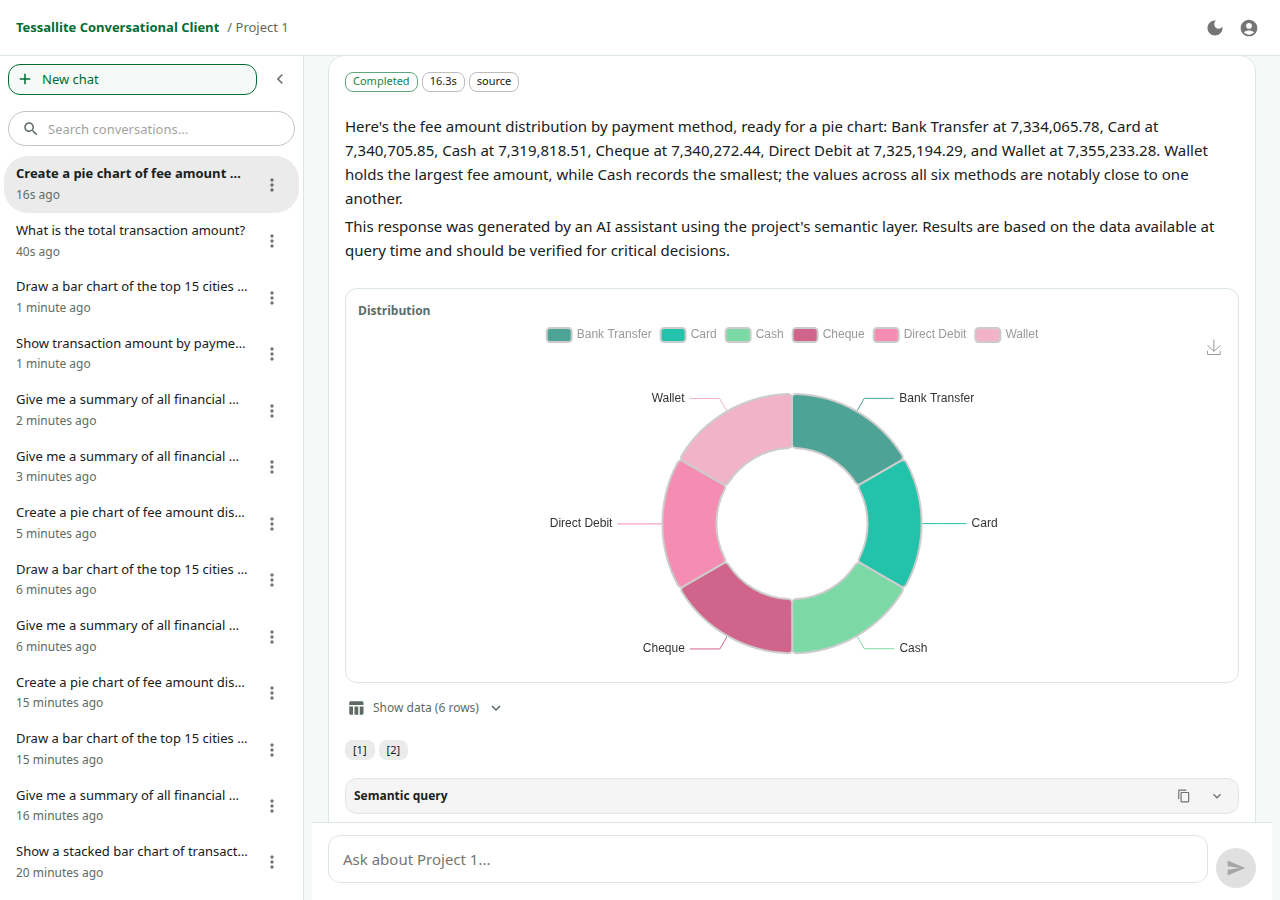
Tessallite conversational agent answering a business question with a donut chart, a data table and the semantic query

Conversational agent

It answers only through the governed model.

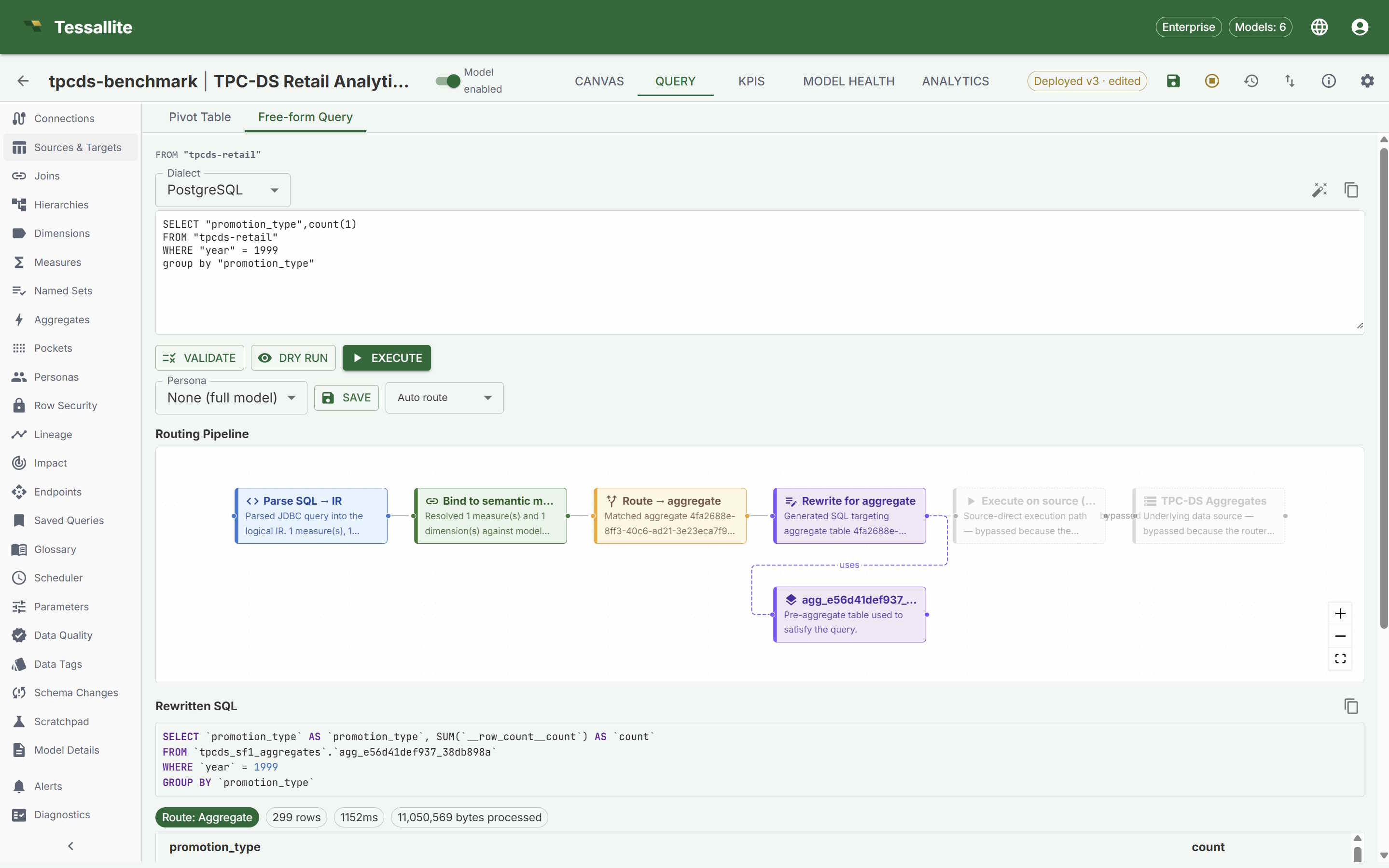
Tessallite query routing screen with SQL rewrite and aggregate route

Query routing

Every query shows the route it took and why it came back fast.
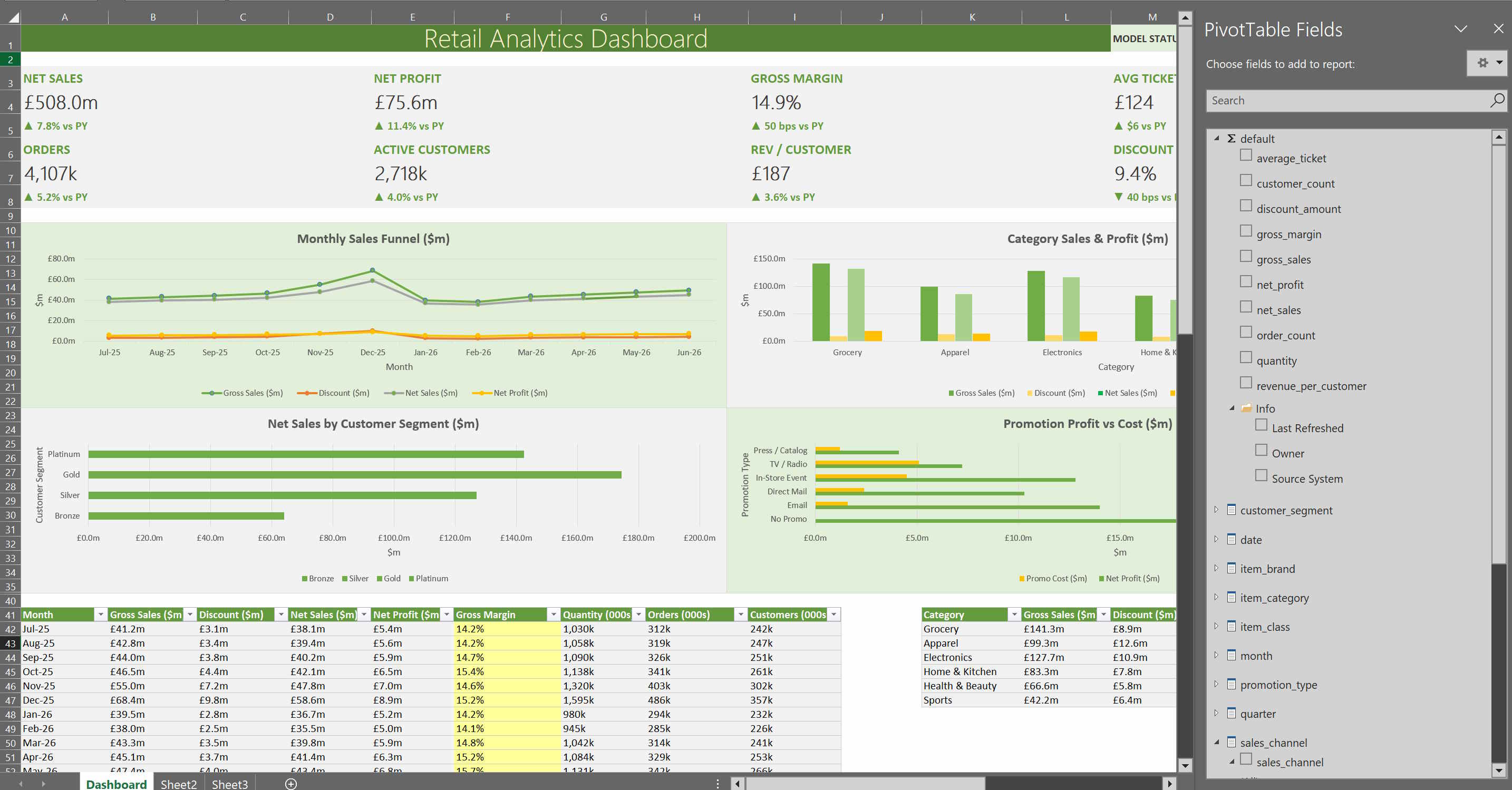
Excel dashboard using Tessallite model fields

Excel workflow

Analysts keep their PivotTables. Definitions come from the model.
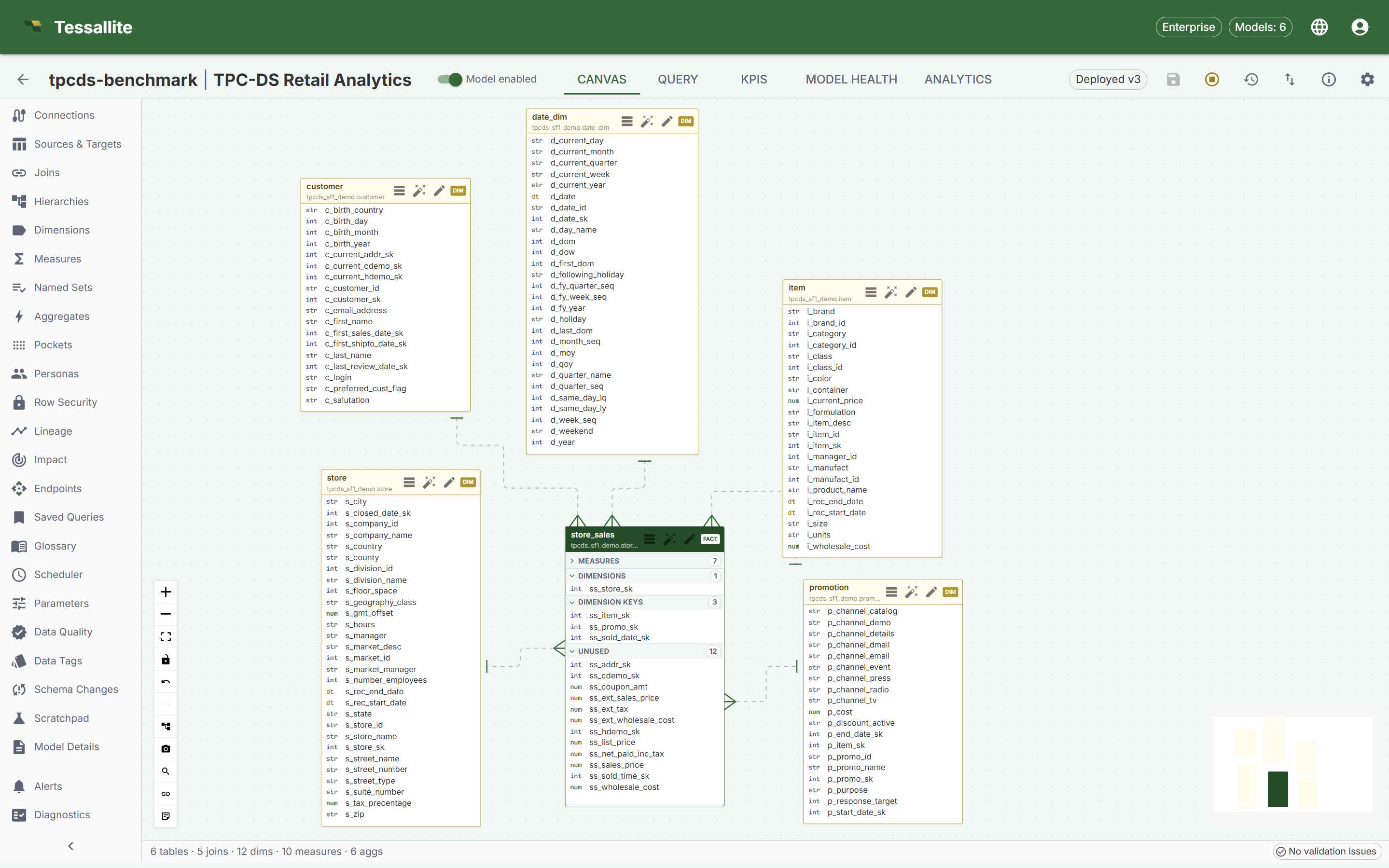
Tessallite Model Builder canvas showing a governed semantic model

Model Builder

Design the whole model in one workspace.

Enterprise control

Security rules travel with every answer.

Excel, BI tools, SQL, APIs and the AI agent all get the same row, column and persona policies.

  • Audience-aware models

    Personas shape what each audience sees. Administrators preview any view before it ships.

  • Row and column controls

    Row and column rules, including data tags, hold across every protocol. A field hidden in the dashboard stays hidden in Excel, SQL and chat.

  • Audit and trace

    Every answer carries its route, owner, freshness and lineage.

Performance, measured

A prepared aggregate cut a 66.01 GB scan to a 1.48 KB read.

Repeated questions need not repeat expensive work.

Cost per 1,000 runs of the simple question

Unaccelerated
$330
Accelerated
$0.05

TPC-DS SF1000 on BigQuery, 2.9B rows; accelerated vs unaccelerated on the same source. Medium and heavy questions cost more. Independent BigQuery tie-out was not measured. Benchmarks ยท Full report

Performance boosters

  • Summary tables

    Rollups for common questions, refreshed automatically.

  • Pocket tables

    Hot slices of big fact tables, kept close to the query.

  • Exact or it goes to source

    If a prepared answer cannot be exact, the query goes to the source.

Connected tools

Every tool connects through one governed Gateway.

Each deployed model is an OLAP cube for Excel and Power BI, a PostgreSQL database for SQL clients, an API for apps and grounded context for AI.

  • Excel and Power BI

    Connect natively over XMLA with nothing to install. Add the Tessallite add-in for KPIs, analysis and Ask.

  • SQL and BI tools

    Any PostgreSQL-compatible client sees only the governed model. Works with DBeaver, Tableau, pgAdmin and psycopg2.

  • Apps and agents

    The REST API, embed API and MCP server put governed answers inside your products.

  • PostgreSQL
  • BigQuery
  • Spark (preview)
  • Redshift (preview)

Day two and beyond

A semantic layer earns trust in month six.

Model health, query logs, usage analytics, impact analysis, refresh history and alerting ship in the product.

  • Model health

    Catch broken measures and failed aggregates early.

  • Usage and impact

    See what gets used before you change it.

  • Export and import

    Promote models between environments. Credentials never travel.

Editions

Prove it on your own infrastructure. Scale when it wins.

Community is free and self-hosted, with core features shared with Enterprise. Enterprise lifts scale limits and adds support and production deployment.

  • Community

    The core platform on your servers, as a signed bundle you can verify.

  • Install guide

    Docker Compose and one installer. Minutes from download to a running stack. Add the demo model with one flag.

  • Enterprise

    Unlimited tenants, models and users. SSO and SLA-backed support.

Every tool. One trusted answer.

Try the hosted demo, or install Community and prove it on your own data.